



Employees expect their digital workplace to reflect who they are, where they work and what they are responsible for.
We provide SharePoint audience targeting and personalisation capabilities that help Internal Communications and IT teams deliver targeted content, personalised experiences and role-based digital workplaces — all governed centrally and grounded in Microsoft Entra ID.
If you’re evaluating SharePoint personalisation tools, Microsoft 365 audience targeting solutions or targeted employee communications platforms, you’ve come to the right place. Native SharePoint provides basic targeting. Our solutions enable organisations to deliver tailored digital employee experiences.


What is SharePoint audience targeting?
SharePoint audience targeting is the practice of delivering different content to specific audiences and groups of users based on defined criteria. Rather than presenting every employee with the same intranet experience, organisations can align content and experiences with role, department, location or interest.
At its most basic, audience targeting means showing an internal announcement to a specific group. In a modern digital employee experience, it means much more:
- Personalised homepages
- Role-based navigation
- Location-relevant content
- Targeted news and campaigns
- Audience-specific resources and services
- Opt-in communities and interest groups
- Different experiences for desk-based, hybrid and frontline employees
For Internal Communications teams, audience targeting is a way to increase the relevance and effectiveness of communications. For IT and Digital Workplace teams, it is a way to improve findability and support governance across a large SharePoint estate.
Audience targeting is one of the most effective ways to move from a broadcast intranet to a personalised digital employee experience.

Why audience targeting matters
A modern intranet supports thousands of employees across different roles, locations, services and business units. Every one of them needs to find information that is relevant to them — and no one has time to filter through content that is not.
Done well, effective SharePoint audience targeting improves communication effectiveness, employee engagement and content relevance for specific audiences across the organisation.
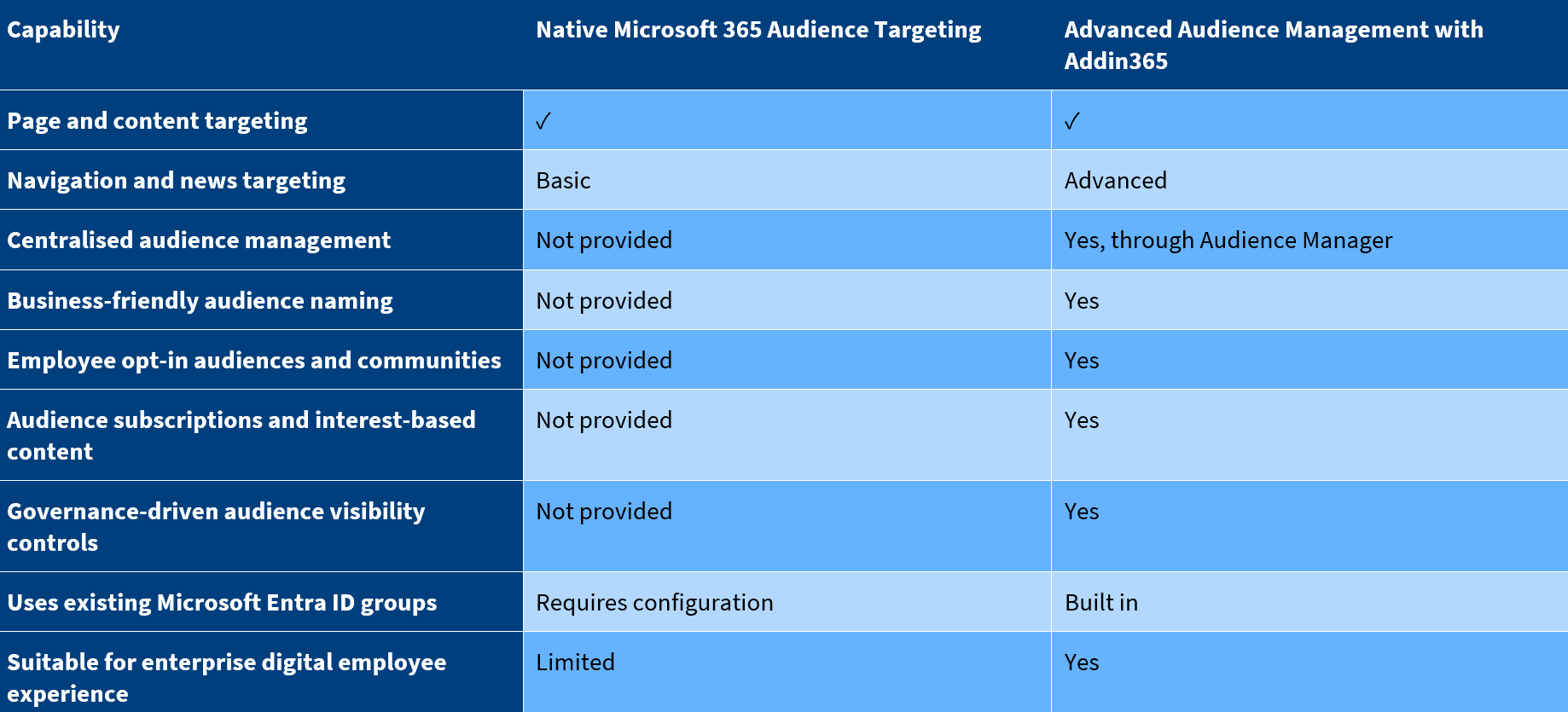
Native Microsoft 365 audience targeting vs advanced audience management
Microsoft 365 provides useful, out-of-the-box audience targeting capabilities across SharePoint, Microsoft Teams and Viva Connections. For many organisations, native audience targeting is a helpful starting point.
While native capabilities were designed to solve targeting at the page and content level, they were not designed to provide a governed audience management model across a modern digital employee experience.
The distinction becomes important as organisations scale.


Targeting by role, department and location
Most organisations start audience design by identifying specific audiences and groups of users based on role, department and location.
These attributes reflect how organisations are structured and how communications are typically planned.
Common examples include:
- Departmental news and updates
- Country- or region-specific communications
- Location-specific guidance and events
- Role-based resources for HR, IT, Sales or Operations
- Manager-only content or leadership updates
- Function-specific resources for specific service lines
- Location-based emergency communications
More sophisticated models may add attributes such as service line, business unit, seniority, contract type or working pattern.
Addin365 Audience Manager supports these models by connecting audiences directly to Microsoft Entra ID groups. This means audience design reflects the real organisation, rather than a duplicated or simplified version of it.
Business-friendly audience names make it easier for Internal Communications and content owners to work with audiences without needing to understand the underlying group structures used by IT.
Office and frontline experiences
Not every employee experiences the intranet in the same way. A modern digital employee experience needs to work for office-based employees, hybrid workers and frontline or operational teams.
With Audience Manager, organisations can design a single Microsoft 365 digital workplace that adapts to how and where different people work, delivered consistently across SharePoint, Teams and Viva Connections.
Entra ID and HR data
Effective audience targeting depends on identity. Microsoft Entra ID provides the identity foundation for Microsoft 365, managing employees, groups, roles and organisational structure.
Many organisations extend this by connecting Entra ID to HR systems such as Workday, SAP SuccessFactors or HiBob. Basic identity data flows into Entra ID, while richer employee profile data can support Microsoft 365 profile experiences, people search and Microsoft Copilot. When profile data is accurate and well connected, organisations can create more meaningful audiences based on role, location, skills, certifications or interests.
Audience Manager builds directly on existing Entra ID groups, allowing organisations to extend and apply this identity foundation through advanced audience targeting. Rather than duplicating audience data, Internal Communications and IT teams can use the groups that already reflect the organisation to deliver governed, personalised digital employee experiences across SharePoint, Microsoft Teams and Viva Connections.
Addin365 Audience Manager
Audience Manager is our capability that provides advanced audience targeting and centralised audience governance for Microsoft 365.
Rather than defining audiences differently in every tool, Audience Manager allows organisations to define specific audiences once, connect them to Microsoft Entra ID and apply them consistently across the digital workplace. This turns audience targeting from a page-level feature into a governed model for personalised digital employee experiences.
Audience Manager helps organisations:
- Deliver targeted and personalised digital employee experiences
- Manage audiences in a single, governed place
- Reuse existing Microsoft Entra ID groups
- Support both organisationally assigned audiences and employee opt-in communities
- Give audiences business-friendly names for internal communications and content owners
- Control audience visibility across connected experiences
- Support subscription models for interest-based content and communications
- Reduce noise and improve communication effectiveness at scale
For internal communications teams, this means audiences can be designed and maintained without needing to understand the underlying Microsoft Entra ID group structure. For IT teams, audience targeting remains grounded in the organisation’s identity model, security policies and governance controls.
For employees, the result is a Microsoft 365 intranet that reflects who they are and what they do — without corporate communications being lost in the noise.
Governance considerations
Audience Manager is designed to work securely with Entra ID. Communications teams can manage approved audiences without being given broad access to every group in the organisation. IT remains in control of the governance model, while communications teams get the practical control they need to manage audience targeting day-to-day.
Deliver personalised digital employee experiences on Microsoft 365
We help organisations move from broadcast intranets to personalised digital employee experiences by combining SharePoint, Microsoft Teams, Viva Connections and governed audience targeting through Audience Manager.
Contact us to discuss how advanced SharePoint audience targeting and personalisation could work in your organisation.
Frequently Asked Questions
What is SharePoint audience targeting?
SharePoint audience targeting is the practice of delivering different content, experiences and communications to different groups of employees based on attributes such as role, department, location or Microsoft Entra ID group membership. It is one of the primary ways organisations create personalised digital employee experiences on SharePoint and Microsoft 365.
What is SharePoint personalisation?
SharePoint personalisation is the design of employee experiences that adapt to context — including role, location, department, interests and behaviour. Effective personalisation typically combines organisationally assigned audiences with employee-driven choices such as opting in to communities or subscribing to specific content.
What is the difference between audience targeting and personalisation?
Audience targeting is defined by the organisation and controls who sees which content. Personalisation is broader and can include audience-driven experiences, employee opt-in choices and dynamic content based on context or preferences. Modern digital employee experiences typically use both.
What is the difference between native Microsoft 365 audience targeting and advanced audience management?
Native Microsoft 365 audience targeting supports content and page-level targeting. Advanced audience management, delivered through Audience Manager, adds centralised audience governance, business-friendly audience naming, employee opt-in communities, subscription models and consistent behaviour across SharePoint, Microsoft Teams and Viva Connections.
How do organisations personalise a Microsoft 365 intranet at scale?
Organisations personalise Microsoft 365 intranets at scale by combining a governed audience model, Microsoft Entra ID group structures and a consistent design approach across SharePoint, Teams and Viva Connections. This helps ensure personalisation reduces noise rather than creating fragmented experiences.
How do you deliver targeted employee communications?
Targeted employee communications typically depend on a clear audience model, aligned to how the organisation is structured. Attributes such as role, department, location and service line are used to control who sees which content, supported by governance to protect essential corporate communications.
How do Microsoft Entra ID groups support audience targeting?
Microsoft Entra ID groups provide the identity foundation for audience targeting in Microsoft 365. Modern audience management, such as Addin365 Audience Manager, uses existing Entra ID groups to define audiences, which means audience targeting reflects the organisation’s identity, HR and security models.
Can audience targeting work across SharePoint, Microsoft Teams and Viva Connections?
Yes. A well-designed audience model should behave consistently across SharePoint, Microsoft Teams and Viva Connections. Audience Manager helps organisations maintain a single audience model that is applied consistently across the Addin365 platform and connected Microsoft 365 experiences.
How do you govern audience targeting at scale?
Audience governance typically requires central ownership of the audience model, clear rules for audience creation, alignment with identity and HR systems, business-friendly naming and controls that protect essential corporate content. Audience Manager provides these controls in a single, centralised experience.
Does Addin365 replace Microsoft 365 audience targeting?
No. Addin365 extends Microsoft 365 audience targeting rather than replacing it. Native audience targeting continues to work; Audience Manager adds advanced audience management, governance controls, opt-in communities and consistent behaviour across the wider digital employee experience.

