



We provide SharePoint intranet solutions that extend SharePoint with brand-aligned page experiences, controlled site provisioning, personalisation, audience targeting and employee-journey analytics. The result is a unified digital workplace that connects SharePoint, Microsoft Teams, Viva Connections and Viva Engage while keeping Microsoft 365 as the underlying platform.
If you’re comparing SharePoint intranet platforms, SharePoint intranet software and SharePoint intranet vendors, you’ve come to the right place. Native SharePoint provides a powerful content, collaboration and security foundation. Addin365 turns that foundation into a measurable, governed and engaging digital employee experience.
Microsoft 365 remains the platform. Addin365 makes it easier to shape that platform around your brand, information architecture, audiences and business objectives.
Microsoft 365-native
Extend SharePoint, Teams, Viva Connections and Viva Engage rather than moving employees into a separate intranet platform.
Designed for enterprise delivery
Combine branded page components, reusable site patterns, controlled provisioning and digital workplace analytics.
Proven in complex organisations
Robert Walters delivered its global ‘Connect’ experience in 12 weeks and recorded 143,122 visits in the first two months.


What is a SharePoint Intranet?
Organisations evaluating SharePoint intranet software are rarely looking for another standalone platform. They are looking for a way to maximise their Microsoft 365 investment while improving employee communications, governance, findability and engagement.
A SharePoint intranet is an employee-facing digital environment built on SharePoint Online. It brings together organisational news, resources, documents, tools and communications in a secure Microsoft 365 environment.
For many organisations, SharePoint provides the ideal intranet foundation because it already forms part of their Microsoft 365 investment. It offers enterprise-grade security, content management and integration with services such as Microsoft Teams, Viva Connections and Viva Engage. Best of all, this is often already set-up by your IT function as SharePoint is normally already in use.
While SharePoint provides the foundation, many organisations require additional capabilities to deliver a truly engaging, governed and personalised employee experience. This is where Addin365 extends native SharePoint with enhanced design, audience targeting, analytics, governance and site provisioning capabilities.
For employees, a modern SharePoint intranet can provide a single destination to:
- Read company and local news
- Find policies and resources
- Access business applications
- Navigate departmental and location information
- Join communities and conversations
- Complete employee journeys such as onboarding
- Discover content relevant to their role or location
For IT and Internal Communications teams, the goal is not simply to publish content, but to create a SharePoint intranet that is easy to manage, easy to scale and capable of delivering measurable business value.

What Makes the Best SharePoint Intranet Platform?
The best SharePoint intranet platforms do more than publish content. They help organisations create a connected employee experience that is easy to manage, simple to scale and closely aligned with Microsoft 365.
A successful platform should build on the strengths of SharePoint while addressing the practical challenges faced by IT and Internal Communications teams.
Microsoft 365 Integration
A modern intranet should work seamlessly with the tools employees already use every day. Integration with Microsoft Teams, Viva Connections, Viva Engage and the wider Microsoft 365 ecosystem helps reduce friction and improve adoption.
Governance
As intranets grow, governance becomes increasingly important. Consistent site structures, controlled provisioning, clear ownership and lifecycle management help organisations maintain quality and reduce risk.
Personalisation
Employees expect relevant information rather than generic communications. Audience targeting and personalised content help reduce noise and improve engagement across different regions, departments and employee groups.
Analytics
The best intranets are measurable. Analytics should provide insight into content performance, employee behaviour and user journeys so organisations can continually improve the experience.
Employee Adoption
An intranet only delivers value if employees use it. A well-planned launch and communications strategy, combined with intuitive design, clear navigation and relevant content, helps build awareness, drive engagement and support long-term adoption.
Mobile Access
Modern workforces increasingly operate across locations and devices. Mobile-friendly experiences delivered through Microsoft Teams and Viva Connections help employees stay connected wherever they work.
Scalability
Enterprise intranets must support growth without creating complexity. Reusable templates, standardised experiences and governance frameworks help organisations scale efficiently.
The best SharePoint intranet platforms do not replace Microsoft 365. They extend it with the capabilities required to create a measurable employee experience.


Where Native SharePoint Needs Extending
Native SharePoint gives organisations a robust starting point, but enterprise intranets commonly require additional work in four areas: experience design, repeatability, relevance and measurement.
1.Translating a brand into usable page experiences
SharePoint pages can be configured and themed, but organisations often need richer editorial components, greater layout consistency and stronger visual alignment across many sites. Our Creative and Page Kit is a collection of webparts that help you to increase personalisation, engagement and brand alignment within the SharePoint Modern experience.
2. Repeating a proven structure
A large intranet may contain home, news, department, community, location and employee-centre sites. Building each manually can result in different navigation, metadata, layouts and ownership models.
Reusable patterns give site owners a governed starting point. They do not prevent local ownership; they establish guardrails so owners are not repeatedly reinventing the same structure.
3. Making a global intranet feel locally relevant
A single global homepage can easily become overloaded. Employees need strategic communications, but they also need information that reflects their role, location, service line or interests.
4. Understanding the employee journey
Page views alone do not explain whether employees found what they needed, how they moved through the intranet or where a journey broke down.
This is the difference between reporting traffic and improving an experience. Communications teams can move from “How many people opened the homepage?” to questions such as “Where did employees go next?” and “Did they reach the intended resource?”
Native SharePoint vs SharePoint Extended by Addin365
Microsoft SharePoint provides a powerful foundation for modern intranets, offering enterprise-grade security, content management and integration across Microsoft 365. However, many organisations require additional capabilities to deliver a consistent, personalised and measurable employee experience at scale.
Addin365 extends native SharePoint with purpose-built capabilities that help IT and Internal Communications teams deliver a more engaging and governed intranet experience without replacing Microsoft 365.
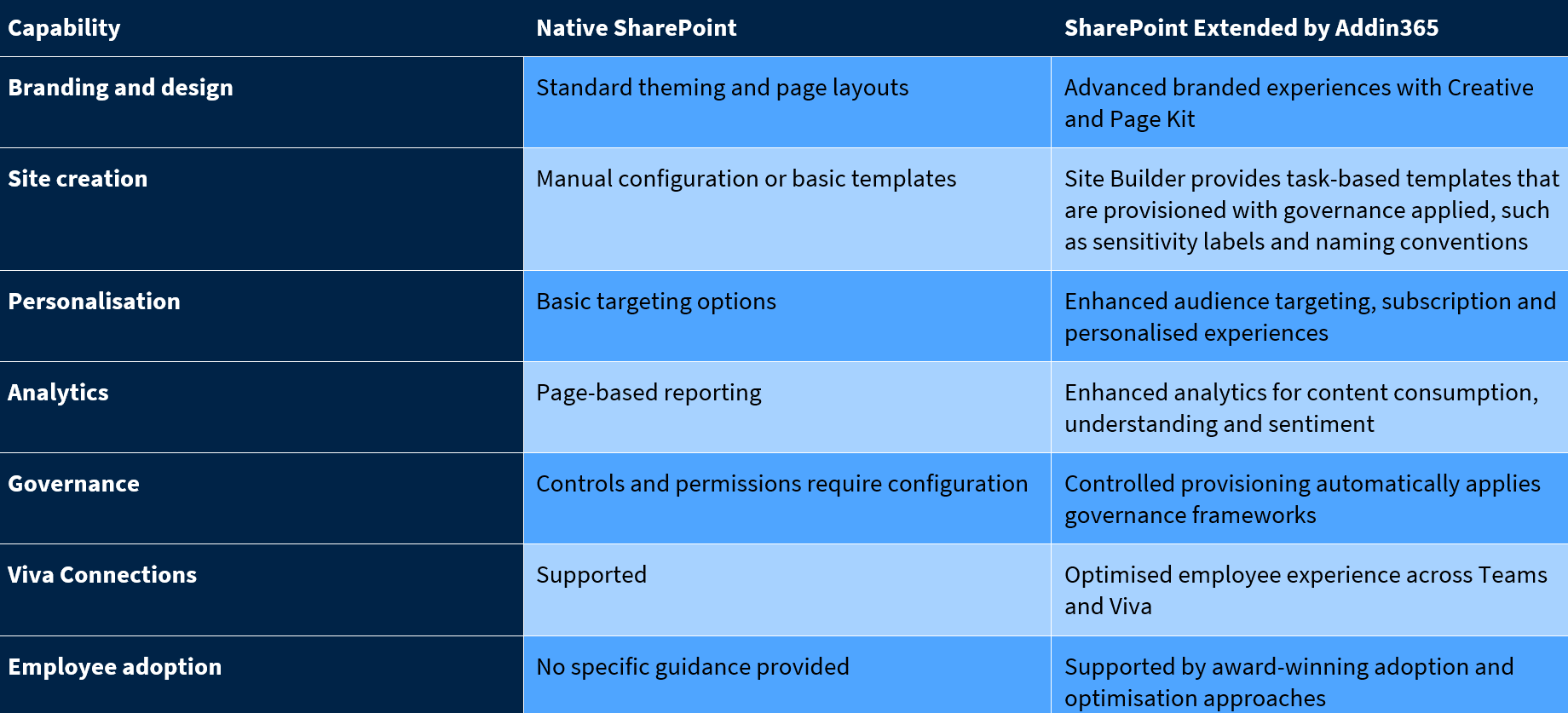
For organisations already invested in Microsoft 365, extending SharePoint often provides a faster and more sustainable route to a modern intranet than introducing a separate platform.
Addin365 Extends SharePoint
Creative and Page Kit
Many organisations choose SharePoint because it is already part of Microsoft 365, but creating a consistent, engaging and brand-aligned intranet experience can still be challenging.
Creative & Page Kit extends native SharePoint with reusable web parts, page components and design experiences that help organisations create more engaging intranet environments without replacing Microsoft 365.
Rather than relying solely on standard SharePoint layouts, Internal Communications teams can create branded experiences that improve consistency, content discoverability and employee engagement across the intranet.
- Creative & Page Kit helps organisations:
- Create brand-aligned SharePoint experiences
- Improve consistency across sites and pages
- Increase content engagement and discoverability
- Accelerate publishing with reusable components
- Enhance the employee experience without custom development
For Internal Communications teams, this means greater confidence that important messages are presented consistently. For employees, it creates a more intuitive and visually engaging environment that encourages exploration and content discovery.
Site Builder
Site Builder provides the provisioning engine and template host for reusable SharePoint site patterns. Instead of starting with an empty site, teams can launch branded, ready-to-edit SharePoint experiences that align with organisational standards from day one.
Site provisioning becomes increasingly important as intranet estates grow. Without clear controls, organisations can quickly accumulate inconsistent navigation, duplicated content structures and varying user experiences across departments, locations and business functions.
Site Builder helps address these challenges by providing a repeatable framework for creating sites that follow agreed standards for branding, navigation and governance. This helps ensure employees experience a consistent journey regardless of which area of the intranet they visit.
For IT teams, controlled provisioning enforces governance standards such as naming conventions, sensitivity labels and guest access controls. For Internal Communications teams, it ensures consistency across site design and content.
The result is faster deployment, reduced administrative effort and a more scalable SharePoint intranet architecture.
Addin Analytics
A modern SharePoint intranet should do more than publish content. It should help organisations understand whether employees are finding information, engaging with communications and successfully completing important journeys.
While native SharePoint reporting provides basic usage data, many organisations struggle to understand the real impact of their intranet and internal communications efforts.
Addin Analytics extends Microsoft 365 with advanced SharePoint analytics designed specifically for Internal Communications, Digital Workplace and Employee Experience teams.
Addin Analytics helps organisations:
• Measure employee engagement across the intranet
• Understand which content drives action and which content is being ignored
• Identify underperforming pages, campaigns and employee journeys
• Measure the effectiveness of internal communications
• Improve content discoverability and findability
• Understand how employees move through the digital workplace
The result is a more measurable SharePoint intranet where teams can continuously improve the employee experience, optimise communications and make decisions based on evidence rather than assumptions.
Bringing the digital employee experience to life
From personalised content and measurable employee journeys to governed experiences and mobile access through Microsoft Teams and Viva Connections, a modern SharePoint intranet should make it easier for employees to find information, stay informed and get work done.
Personalisation and Audience Targeting
Personalisation should reduce noise, not hide important information.
A well-designed SharePoint intranet balances common corporate communications with content that changes according to a person’s context. That context may include role, department, location, service line or a subscription chosen by the employee.
Addin365’s approach can support:
- targeted global, regional and departmental news;
- personalised navigation;
- role- or location-relevant homepage content;
- audience-specific resources and links;
- interest-based subscriptions: Allows employees to subscribe to topics or areas of interest and receive relevant content updates automatically.
- different experiences for desk, mobile and externally placed employees.
Audience design still requires governance. Global messages must remain global; regulatory or mandatory content should not become optional; and audiences must be maintained as roles and structures change. Addin365 combines audience design with information architecture and content planning rather than treating targeting as a standalone switch.
Analytics and Employee Journeys
A SharePoint intranet should be managed as a living employee experience. That requires evidence.
Addin Analytics is intended to help teams understand content engagement and employee journeys across the intranet. An analytics-led operating model can help teams answer:
- Which content attracts repeat use?
- Which sections are being overlooked?
- Are employees reaching the destination intended by a campaign?
- Where do they leave a journey?
- Which audience experiences perform differently?
- Should navigation or page layouts change?
- Is an important resource discoverable from the homepage?
Governance Built In
Whether employees are visiting a department site, location page, community hub or employee service area, the intranet feels familiar and predictable because agreed standards have been applied from the moment sites are created. Navigation follows consistent patterns, important information is easier to find, and employees spend less time working out where content lives.
Behind the scenes, governance helps ensure standards such as naming conventions, sensitivity labels, guest access settings and ownership models are applied consistently as new sites are created. The result is a more reliable, secure and intuitive intranet experience that can scale without becoming fragmented or difficult to manage.
A Mobile Experience at Your Fingertips
An intranet creates more value when employees can reach it from the applications they already use.
SharePoint content can be surfaced through Microsoft Teams and Viva Connections, making it easier to access news, resources, applications and services without switching between multiple platforms. Viva Engage can surface communities and conversations alongside more structured corporate news and resources.
Whether employees are desk-based, remote or frontline, they can stay connected through a familiar Microsoft 365 experience across desktop and mobile devices.
This gives organisations a practical channel model:
SharePoint for structured, governed information and publishing;
Microsoft Teams for everyday access and collaboration;
Viva Connections for an employee-facing entry point and mobile experience;
Viva Engage for communities, discussion and participation;
The Addin365 suite for the branded, personalised, provisioned and measurable experience across those services.
Award Winning: Robert Walters ‘Connect’ Digital Workplace
Our solutions provide long term value and meet business objectives for employee engagement as shown in our case studies.
Robert Walters launched Connect as a central Microsoft 365 hub for company news, resources, collaboration and communities. The project connected 3,300 employees globally, incorporated targeted and personalised content and was delivered end to end in 12 weeks.
In the first two months after launch, Robert Walters recorded:
143,122 visits to Connect;
One to two visits per person per day;
An average of 15 minutes per person, per visit;
A 355% increase in unique visitors, reaching 3,301 users.
9 months post launch, Robert Walters recorded:
306,998 visits to Connect
Approximately 2 visits per person per working day.
Average session duration of 10 minutes per visit.
The project subsequently won Silver for Best Intranet at the Internal Communications and Engagement Awards. Robert Walters also received an IoIC Award of Excellence and a top-five shortlist place, and was shortlisted in the Digital Workplace Group Awards.
Client success stories
St. James’s Place
Challenge: Modernise the employee experience while moving from Alfresco to SharePoint.
Solution: Implement a Microsoft 365 intranet supported by Addin365 capabilities including Creative and Page Kit, Site Builder and Analytics.
Scale: Supporting approximately 19,000 partners and 5,000 employees.
Wincanton
Challenge: Deliver an effective intranet experience for a distributed and mobile workforce.
Solution: Use Microsoft 365, Viva Connections and Addin365 capabilities to improve access to information and communications.
Workforce Type: Large frontline, operational and mobile employee population.
Gatehouse Bank
Challenge: Create a digital employee experience that reflected organisational culture and values.
Solution: Extend Microsoft 365 with Addin365 intranet capabilities to deliver a more engaging and connected employee experience.
Outcome: Improved alignment between employee communications, culture and the digital workplace experience.
Transform SharePoint into a Modern Intranet Platform
We help organisations get more value from Microsoft 365 by creating engaging, governed and measurable SharePoint intranet experiences. Whether you’re launching a new intranet, modernising an existing SharePoint environment or looking to improve employee engagement, our team can help.
Contact us to discuss your goals and discover how Addin365 can help you deliver a better SharePoint intranet.
Frequently Asked Questions
Is Addin365 a replacement for SharePoint?
No. Addin365 extends SharePoint and Microsoft 365, plugging the gaps in Microsoft’s native offering. SharePoint continues to provide sites, pages, content, permissions and core platform services. Addin365 adds branded experiences, reusable site patterns, provisioning, personalisation and analytics.
What is the difference between native SharePoint and SharePoint extended by Addin365?
Native SharePoint provides the foundation. Addin365 addresses the experience around that foundation: how consistently sites are created, how closely pages align to the brand, how content is targeted, how Viva services are incorporated and how employee journeys are measured.
How much does a SharePoint intranet cost to deliver?
SharePoint intranet costs vary depending on your requirements, the level of customisation and the capabilities you want to include. Contact us to discuss your project and receive tailored pricing guidance.
How long does it take to build a SharePoint intranet?
Project timescales depend on scope, governance, content readiness and integrations. For example, Addin365 helped Robert Walters deliver its global Connect digital workplace in just 12 weeks, with a communications team of one person.
Is Addin365 Microsoft 365-native?
Yes. Addin365 products are designed for SharePoint Online and the wider Microsoft 365 experience. Customer deployments connect SharePoint with Teams, Viva Connections and Viva Engage while continuing to use SharePoint permissions and content services.
Can Addin365 support a global intranet?
Yes. Addin365 has many global clients with role- and location-based experiences and communications across different employee groups.
How quickly can a SharePoint intranet be deployed?
Timelines depend on scale, content readiness, governance and decision-making. Addin365 helped global recruitment consultancy Robert Walters to deliver a new Microsoft 365 digital workplace in just 12 weeks.
Can the intranet be accessed through Microsoft Teams?
Yes. Viva Connections can provide access to the SharePoint intranet through Teams, while Viva Engage communities can be surfaced alongside intranet content. The specific configuration depends on licensing and project scope.
Does Addin365 offer SharePoint analytics?
Yes. Addin Analytics supports custom analytics views and employee-journey analysis; with detailed journey visualisation within Analytics Insights.
Can site owners create their own sites?
Site Builder can provide authorised owners or administrators with reusable site patterns. The exact provisioning and approval model is agreed as part of governance and can be restricted to appropriate roles.
Can Addin365 provide audience-targeted content?
Yes. Addin365 supports personalised and audience-relevant experiences, including role-, location- and interest-based content models. Targeting should be designed alongside the information architecture so essential global content remains visible.
Why choose Addin365 over a separate intranet product?
Choose Addin365 when you want to retain Microsoft 365 as the strategic platform while extending SharePoint’s brand experience, provisioning, targeting and analytics. This can be particularly relevant when employees already work in Microsoft Teams, Outlook and SharePoint and the organisation does not want to introduce another isolated content platform.

